

Wondering why you’re getting an ” access forbidden ” error when you’re trying to reach a website?
403 Access Forbidden message errors are now fairly common. They can be confusing to users when they pop up.
When you see a 403 Access Forbidden error, it means that you do not have permission to view the requested file or resource. Most of the time, it is due to misconfigured permissions, but it can also be intentional. When you see this error, the website is saying, “Leave and don’t come back.”
What can you do?
If you are trying to access a website and get the specific message below, check the URL in the address bar. It will show an incorrect URL because some malware has been installed on the browser:
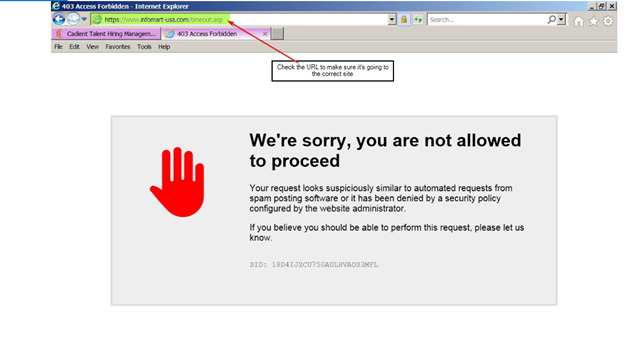
Malware, aka “malicious software,” is an umbrella term describing any malicious program or code harmful to systems. You may have gotten malware while on the internet or from an email. There are so many ways for your computer to become “infected” with malware that it’s best to get your IT professionals involved.
Your IT team can advise you on the best way to have the malware removed. Until then, use a different browser (i.e., Chrome instead of MS Edge) to access the site.
Other Useful Resources
Applicant tracking system software
Applicant pool
Evergreen job posting
Recruitment in hospitality industry
