By Abhishek Patel · May 4, 2026
When you hear “recruitment analytics software,” you probably picture dashboards full of charts, numbers that promise faster hires, and a magic button that cuts cost‑per‑hire in half. It’s not a fantasy – it’s a real‑world lever that today’s talent teams use to turn raw applicant data into actionable insight. In this guide I’ll break down what the software does, why it matters, and exactly how you can pick the right tool for your organization.
What Is Recruitment Analytics Software
Definition and Core Purpose
At its heart, recruitment analytics software gathers every data point from your hiring funnel – click‑through rates, interview scores, offer acceptance – and transforms it into metrics you can act on. It’s the “why” behind every hire, not just the “who.” Think of it as the brain behind your
applicant tracking system (ATS), turning raw logs into strategy.
Difference from Traditional ATS
Most ATSs record who applied and where, but they rarely tell you if a source is delivering quality talent or if your interview process is dragging candidates away. Recruitment analytics adds a layer of insight: you get time‑to‑fill trends, source‑of‑hire ROI, and even quality‑of‑hire scores. In short, an ATS is the ledger; analytics is the report card.
Why Recruitment Analytics Matters in Modern Hiring
Impact on Time‑to‑Fill and Cost‑Per-Hire
According to a 2023 industry benchmark, firms that use hiring analytics cut time‑to‑fill by 22% and slash cost‑per‑hire by up to 18%. Those numbers translate to hundreds of thousands of dollars saved for a mid‑sized tech company hiring 150 people a year.
Data‑Driven Decision Making
Imagine you can spot that candidates sourced from LinkedIn take 12 days less to onboard than those from job boards. You can shift budget instantly, no guesswork involved. That’s the power of recruitment data insights tools – they let you decide with confidence, not intuition.
Core Features of Recruitment Analytics Software
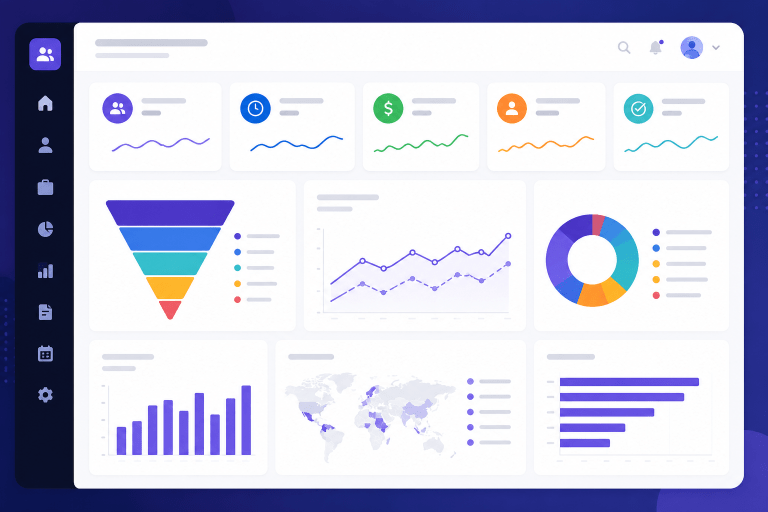
Dashboards and Real‑Time Reporting
Most platforms ship with visual dashboards that update as soon as a new application lands. You can spot bottlenecks the moment they happen. A good example is Greenhouse’s
Analytics Suite, which shows a live heat map of where candidates drop out.
Source‑of‑Hire Tracking
Knowing which channel produces the highest
quality‑of‑hire score is gold. Some tools even assign monetary value to each source, helping you prove that a $1,200 spend on niche tech forums delivers a $9,800 ROI.
Time‑to‑Hire and Cost‑Per‑Hire Metrics
These two KPIs sit at the center of every hiring leader’s dashboard. Advanced reporting lets you slice them by department, role level, or geography – perfect for spotting that your senior sales hires are taking 35% longer than junior engineers.
Quality‑of‑Hire Analytics
Beyond speed, you need to know if new hires stick around and perform. Quality‑of‑hire combines performance ratings, 90‑day retention, and hiring manager satisfaction into a single score. When you see a dip, you can investigate whether interview questions need tightening.
Advanced Features to Look For
Predictive Hiring and AI Matchmaking
Some
talent acquisition analytics platforms use machine learning to predict a candidate’s likelihood to accept an offer or succeed in the role. For example, SmartRecruiters’
Predict module flags top‑ranked matches before a recruiter even screens a resume.
Retention and Turnover Forecasting
If your data shows that hires from a particular campus have a 40% turnover rate after six months, you can intervene early. Predictive turnover models help you allocate onboarding resources where they matter most.
Integration with HRIS and CRM
The best tools talk to the rest of your stack: HRIS, payroll, learning management systems, even your sales CRM. Seamless integration means you can pull performance data into your hiring metrics without manual spreadsheets.
Benchmarking Against Industry Standards
Want to know if your 28‑day average time‑to‑fill is good? Benchmarking features compare you to peers in your sector, size, and region. That context turns an isolated number into a competitive insight.
How to Evaluate Recruitment Analytics Tools
Checklist of Must‑Have Capabilities
- Real‑time dashboards that you can customize for different stakeholders
- Source‑of‑hire attribution with monetary ROI calculation
- Built‑in predictive models or the ability to add them via APIs
- Secure data pipelines to HRIS, payroll, and external job boards
Pricing Models and ROI Calculation
Most vendors charge per active user or per hire processed. To figure out payback, start with a baseline: if your current cost‑per‑hire is $5,200 and the tool promises a 15% reduction, that’s $780 saved per hire. Multiply by projected hires, subtract the subscription, and you have a quick ROI estimate.
Data Security and Compliance Considerations
Recruitment data includes personal identifiers, interview notes, and sometimes background check info. Look for platforms that are GDPR‑ready, support data encryption at rest, and provide audit logs for EEOC compliance. A solid compliance checklist saves you headaches down the road.
Use Cases of Recruitment Analytics Software
High‑Volume Hiring
A retail chain needed to staff 1,200 seasonal roles in 8 weeks. By using recruitment reporting tools to prioritize the top‑performing job boards, they cut time‑to‑fill by 30% and stayed within budget.
Agency Performance Comparison
One tech firm works with three staffing agencies. With a single analytics dashboard, they could see that Agency B delivered 20% higher quality‑of‑hire scores, prompting a renegotiation of rates.
Diversity and Inclusion Metrics
Tracking gender, ethnicity, and veteran status at each funnel stage uncovered a 12% drop‑off for women after the phone screen. The hiring team adjusted interview scripts, and within a quarter the diversity ratio improved by 5 points.
Challenges in Using Recruitment Analytics
Data Quality and Integration Hurdles
If your ATS fields aren’t standardized, any analytics you build will be shaky. Spend time cleaning data and mapping fields before you expect accurate insights.
Change Management and User Adoption
Even the slickest dashboard won’t help if recruiters ignore it. Start with a pilot group, showcase quick wins, and embed analytics into weekly hiring reviews.
Privacy and Ethical Concerns
Predictive models can unintentionally bias decisions. Make sure your vendor offers transparency on algorithmic factors and lets you audit for discrimination.
Future Trends in Recruitment Analytics
AI and machine learning are moving from “nice‑to‑have” to “must‑have.” Expect skill‑gap analysis that maps current workforce capabilities against market demand, flagging emerging talent pools before you even post a job. Also, look for platforms that combine employee performance data with hiring metrics, creating a full‑life‑cycle talent view.
And don’t overlook the rise of low‑code analytics. Smaller businesses can now build custom reports without a data engineer, meaning the ROI of recruitment analytics software is no longer limited to Fortune‑500 firms.
So, how do you pick the best tool? Start with the checklist, run a quick ROI calculator, and make sure the vendor’s security posture matches your compliance needs. Then, test the dashboards with a real hiring manager – if they can spot a problem in 60 seconds, you’ve likely found a winner.
In the end, recruitment analytics software isn’t just a fancy add‑on; it’s the compass that guides today’s hiring strategy. Use it to cut waste, boost quality, and build a talent pipeline that future‑proofs your business.
Frequently Asked Questions
What are the main benefits of implementing recruitment analytics software?
It shortens time‑to‑fill and lowers cost‑per‑hire by highlighting bottlenecks, improves the quality of hire through data‑driven sourcing decisions, and helps reduce bias by exposing patterns in the hiring process. Additionally, real‑time insights enable faster adjustments to talent strategies.
How does recruitment analytics differ from a traditional applicant tracking system (ATS)?
An ATS primarily manages candidate flow and stores resumes, while recruitment analytics adds layers of data aggregation, visual dashboards, and predictive modeling. It turns raw hiring data into actionable insights rather than just a storage repository.
Which key metrics should I monitor with recruitment analytics?
Track time‑to‑fill, cost‑per‑hire, source‑of‑hire, candidate conversion rates at each funnel stage, quality‑of‑hire scores, and diversity ratios. Monitoring these metrics reveals where improvements are needed and measures the impact of hiring initiatives.
What criteria are most important when evaluating recruitment analytics tools?
Look for user‑friendly dashboards, customizable reporting, seamless integration with existing HRIS/ATS, robust predictive analytics, compliance with data‑privacy regulations, and transparent pricing. A trial or demo can also reveal how well the tool fits your organization’s workflow.
Can recruitment analytics software integrate with my current HR systems?
Most modern solutions offer APIs and pre‑built connectors for HRIS, ATS, job boards, and CRM platforms, enabling bi‑directional data sync. Verify supported integrations and data mapping capabilities before purchase to ensure a smooth implementation.
Related