By Abhishek Patel · May 6, 2026
If you’ve ever stared at a spreadsheet full of candidate names and wondered why hiring feels like a marathon, you’re not alone. A recruitment automation platform can turn that marathon into a sprint, shaving days off your time‑to‑fill and letting you focus on the human side of talent. In the next few minutes I’ll walk you through what the technology actually does, which features matter most, and how you can roll it out without pulling your hair out.
What Is a Recruitment Automation Platform?
At its core, a
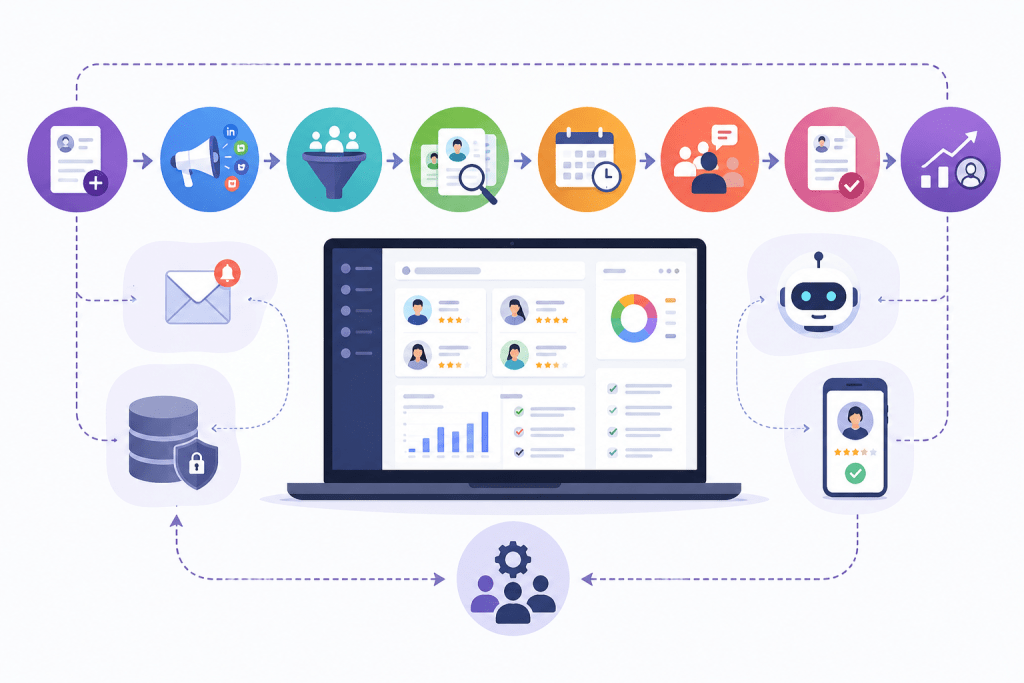
recruitment automation platform is a software suite that orchestrates every step of the hiring journey—from posting the job to extending the offer—without you having to chase spreadsheets or copy‑paste emails. Think of it as the conductor of an orchestra, keeping the strings, brass, and percussion in perfect sync. You’ll find components like AI‑driven sourcing, interview scheduling bots, and real‑time analytics all living under one roof.
There are two camps in the market: stand‑alone tools that specialize in one piece of the puzzle (say, resume parsing) and integrated suites that promise an end‑to‑end experience. Which one fits your organization depends on the size of your team, your current tech stack, and the level of
talent acquisition workflow design you’re after.
Key Stages of an Automated Recruitment Workflow
- Job posting: Auto‑publish to 30+ boards with a single click.
- Sourcing: AI scans LinkedIn, GitHub, and niche sites for matching profiles.
- Screening: Chatbots qualify candidates, while resume parsers rank them.
- Interview coordination: Calendar sync and video‑link generation happen automatically.
- Offer & onboarding: Digital contracts flow straight into your HR system.
These stages form the backbone of any
automated recruitment workflow. Map them out on a whiteboard, then ask yourself: which steps are still manual in my current process?
Designing an Efficient Hiring Workflow
First, sketch the ideal flow on paper. I like to start with a simple diagram: job posting → sourcing → screening → interview → offer. Once you have that visual, plug in the automation touchpoints. For example, use a recruitment workflow automation rule that triggers an SMS reminder three days before a scheduled interview.
Now, consider the unique needs of your industry. A tech startup might need rapid code‑challenge distribution, while a healthcare firm must verify certifications before the interview stage. That’s where customizable workflow templates shine—they let you swap out modules without rewriting the entire process.
Automating Candidate Communication
Ever sent the same “Thanks for applying” email to 200 candidates? Automation can handle that in seconds. Modern platforms support email, SMS, and even chatbot conversations. Candidates get instant acknowledgment, interview invites, and status updates, keeping the experience smooth.
And don’t forget interview reminders. A well‑timed push notification reduces no‑shows by up to 30%, according to a 2023 study from the HR Tech Survey. If you’re wondering whether bots sound robotic, you can personalize the language with merge fields, making each message feel human.
Integrating ATS CRM and HR Systems
Integration is the secret sauce that separates a good tool from a great one. A robust platform should sync with popular ATSs like Greenhouse, Lever, Gem, and Workable, as well as your CRM and HRIS. When a candidate moves from “screened” to “interviewed,” the status updates across every system automatically.
That means no more double‑entry, and it gives you a single source of truth for your recruitment pipeline automation. I once helped a mid‑size agency connect their ATS to a background‑check service; the time saved on manual data entry was equivalent to hiring an extra recruiter.
Workflow Analytics and Performance Tracking
Data isn’t just for finance departments. With a HR workflow management system, you can watch metrics like time‑to‑fill, cost‑per‑hire, and candidate experience score in real time. Dashboards let you spot bottlenecks—maybe your screening stage is lingering at an average of 4 days, while the interview stage is a swift 1 day.
Use these insights to iterate. If you notice a spike in drop‑off after the initial email, tweak the messaging or shorten the questionnaire. Continuous improvement is where the ROI really shines.
Benefits of End-to-End Recruitment Automation
- Speed: Reduce time‑to‑fill by 20‑40%.
- Cost savings: Lower cost‑per‑hire thanks to fewer manual hours.
- Consistency: Every candidate follows the same unbiased process.
- Scalability: High‑volume hiring becomes manageable with bots handling screening and scheduling.
- Better data: Real‑time analytics drive smarter decisions.
In a recent case study, a fintech firm cut its hiring cycle from 45 days to 26 days after implementing a hiring process automation platform. The secret? Automating interview coordination and using AI to rank resumes, freeing recruiters to focus on relationship building.
Common Challenges in Workflow Automation
Even the best tools hit snags. Integration headaches are the most common—old legacy systems don’t always play nice. Then there’s change resistance; recruiters can feel threatened by bots. Finally, data‑privacy compliance can be a minefield, especially if you’re handling EU candidate data.
But each challenge has a remedy. Start with a pilot group, involve recruiters in the design phase, and choose a platform that offers GDPR‑ready data handling. A phased rollout reduces risk and builds confidence across the team.
Future Proofing with Machine Learning
Automation isn’t static. The most forward‑thinking platforms let you train machine‑learning models on your own hiring data, continuously improving candidate ranking accuracy. Over time the system learns which traits predict long‑term success in your company, making predictions more reliable.
And if you’re worried about black‑box AI, look for
explainable AI features that show recruiters why a candidate received a certain score. Transparency builds trust—and trust drives adoption.
Compliance and Data‑Privacy Considerations
Recruiting touches sensitive personal data, so compliance can’t be an afterthought. Ensure the platform offers role‑based access controls, encryption at rest, and audit logs. In the US, you’ll need EEOC‑compatible screening to avoid bias accusations. In Europe, GDPR mandates clear consent for storing candidate information.
Now, imagine you’re a staffing agency handling 10,000 applicant records yearly. A single breach could cost you millions. Investing in a platform that prioritizes security isn’t just good practice; it’s a business safeguard.
Customizable Workflow Templates for Niche Industries
What works for a SaaS startup might not fit a hospital’s hiring cycle. Look for platforms that let you build industry‑specific templates—think credential verification steps for healthcare, or coding test integrations for tech.
One of my clients in the logistics sector added a “truck‑operator license check” step to their workflow. The custom template reduced manual validation time from 3 days to a few hours, and the compliance team breathed a sigh of relief.
ROI Calculation and Real‑World Example
Before you sign off on any tool, run a simple ROI model. Estimate the total hours recruiters spend on manual tasks per hire, multiply by their hourly rate, then compare that to the subscription cost plus implementation fees.
For instance, a company with 5 recruiters each spending an average of 8 hours per hire on scheduling and email follow‑ups would incur $120,000 in labor annually (assuming $30/hr). After adopting a recruitment automation platform costing $25,000 per year, they saved roughly $95,000—an 80% return on investment within the first year.
Change‑Management Tips for Adoption
Implementation isn’t just a tech project; it’s a people project. Start by identifying “automation champions” on your recruiting team—people who love trying new tools. Give them early access, let them experiment, and then have them train the rest of the crew.
And communicate the why: automation frees recruiters to spend time on strategic activities like talent branding and candidate relationship building. When everyone sees the personal benefit, resistance fades fast.
Wrapping It Up
Choosing a recruitment automation platform isn’t about chasing the latest buzzword; it’s about solving real pain points in your hiring process. By mapping your workflow, integrating the right systems, and keeping an eye on compliance, you can unlock faster hires, lower costs, and a better candidate experience.
Remember to start small, measure relentlessly, and let the data guide your next improvement. With the right blend of AI, analytics, and customizable templates, your talent acquisition engine can run like a well‑oiled machine—ready for today’s hiring storms and tomorrow’s challenges.
Frequently Asked Questions
How does a recruitment automation platform differ from a traditional ATS?
A traditional ATS mainly stores resumes and tracks applicants, while a recruitment automation platform orchestrates end‑to‑end workflows, including candidate sourcing, communication, interview scheduling, and analytics. It connects multiple systems (CRM, HRIS) and uses rule‑based or AI‑driven actions to reduce manual tasks.
What are the must‑have features when evaluating a recruitment automation tool?
Key features include configurable workflow builders, omnichannel candidate messaging, seamless ATS/CRM integration, real‑time reporting dashboards, and AI assistance for resume parsing or candidate matching. Security controls and compliance tracking (e.g., GDPR, EEOC) are also essential.
Can small businesses realistically adopt recruitment automation, and what company size is ideal?
Yes, cloud‑based platforms offer scalable pricing that suits teams of 10‑50 hires per month. Small to mid‑size firms benefit most when they face high volume hiring or repetitive processes, as automation quickly pays for itself through time savings.
How long does it usually take to set up an automated hiring workflow?
Implementation time varies from 2‑4 weeks for template‑based setups to 8‑12 weeks for fully customized integrations. The timeline depends on the complexity of existing systems, data migration needs, and the depth of workflow customization.
What metrics should be monitored to gauge the ROI of recruitment automation?
Track time‑to‑fill, cost‑per‑hire, candidate drop‑off rates at each stage, and recruiter productivity (e.g., hires per recruiter hour). Comparing these figures before and after automation highlights efficiency gains and cost reductions.
Related